Bayesin Analyst

Your marketing data analyst,
on every page.

Ask Bayesin Analyst what is driving revenue, where the next dollar should go, or what the forecast says. Every number in the answer comes from your own data, and you can see exactly where.

Overview

Answers you can check, not answers you have to trust.

Bayesin Analyst opens beside whatever page you are on, and already knows which page and which model fit you are looking at. It works from the same published data and model as your dashboards. Every figure is checked against your data before you see it, and if an answer can't be verified, the analyst says so and shows the evidence it gathered.

Ask it like you would ask your analyst

Plain-language questions, answered from your own data in seconds.

  • Which channel has the most room to grow?
  • How did revenue change against the last 52 weeks?
  • What happens if I move $20,000 from Display to Search?
  • How should I split a $150,000 budget?
  • What does the forecast say, and how wide is the range?
  • Where does the model disagree with last-click attribution?
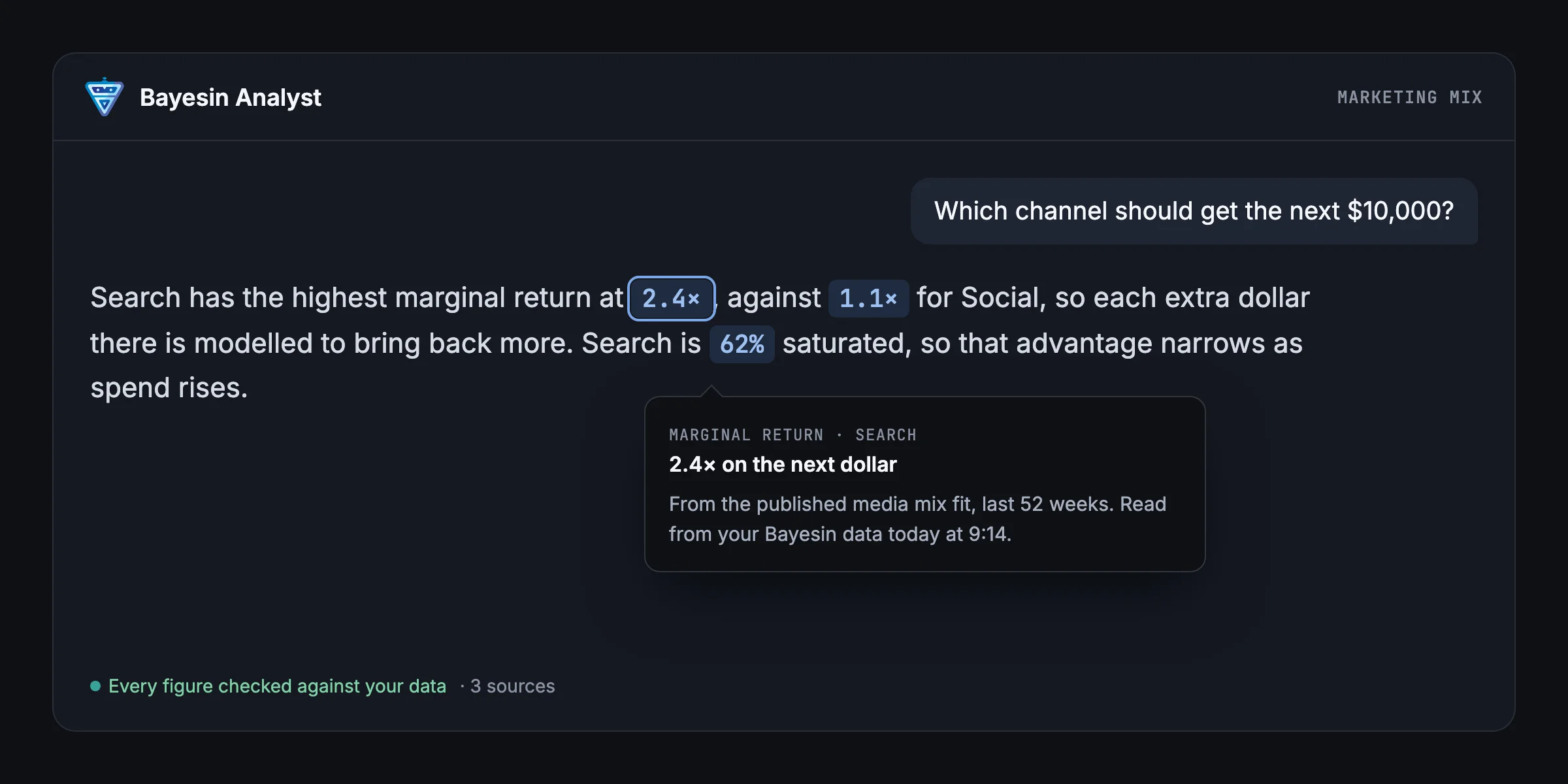
Every figure, traced to its source

Hover any figure to see what it is, the period it covers, where it came from, and when the data was read.

IllustrativeBayesin Analyst answering which channel should get the next $10,000: Search's marginal return of 2.4 times against 1.1 times for Social, with a tooltip showing where the figure came from. Illustrative figures.

What you can ask

The same data and model as your dashboards.

When it needs a new number, such as the difference between two channels' returns, the calculation runs on Bayesin's servers from figures already in the answer.

Performance

Revenue, spend and conversions over any window, in total or by channel.

Model fit

Each channel's contribution, average and marginal return, saturation, and 80% credible intervals.

Forecast

Projected revenue by week, with its range.

What-if planning

Simulate a budget change or find the best split of a total, using the amounts you type.

Attribution

Credit under each of the six attribution models, clearly labelled as non-causal.

Model vs attribution

Where your media mix model and your attribution credit agree or differ, channel by channel.

Built so it can't make numbers up.

Every figure is traced.

Each number in an answer links back to your Bayesin data or to a calculation Bayesin ran. Hover it to see the source and the date.

The AI doesn't do arithmetic in its head.

New numbers, like ratios and changes, are calculated on Bayesin's servers from figures already in the answer. Different currencies are never added together.

Missing data stays missing.

If a figure isn't available, the analyst tells you why. It never fills the gap with a zero.

Unverified answers are flagged.

If an answer doesn't pass the check, you won't see an unchecked number. You'll see the evidence instead.

What-ifs use your numbers.

Budget scenarios only use amounts you typed yourself, in your own currency.

Read-only.

The analyst reads and calculates. It never changes your data, models or campaigns.

A one-click brief on any page.

Not sure what to ask? Choose Brief me on this page for a short, checked summary of what Overview, Marketing Mix, Forecast or Attribution is showing right now. Then ask a follow-up in the same panel.

Your data, your call.

  • AI features can be switched off for your whole organization in Settings.
  • Your chats are private to you, saved with the evidence behind each answer so you can come back to them.
  • The analyst only sees what you can already see in Bayesin.
  • If you leave an organization, you lose access to its chats and connections straight away.

MCP connector

Bring Bayesin into the AI assistant you already use.

Connect Bayesin to AI assistants that support MCP, such as Claude and ChatGPT, and ask about your marketing performance, model fit, forecast and attribution alongside the rest of your work.

You choose what connects

Sign in with your Bayesin account, pick the organization and approve the connection. The consent screen says plainly that figures will be shared with your AI provider.

Admins stay in control

External connections are off until an admin turns them on. Admins can see every connection in the organization, revoke any of them, and review which tools were used.

Same rules, same data

Your assistant gets the same read-only tools and the same figures as the in-app analyst, with the source and date attached to every result.

Clear about where checking ends

Bayesin guarantees the figures it returns. Conclusions your assistant draws beyond those figures are its own, and each result says so.

Questions

Which AI model does Bayesin Analyst use?

The in-app analyst runs on Anthropic's Claude, provided by Bayesin through AWS. You don't need your own AI account. With the MCP connector, you use your own assistant instead.

Can it get a number wrong?

Every figure it shows is checked against your Bayesin data first. The model's estimates can still be uncertain, and the analyst shows that uncertainty where the model gives it, such as 80% credible intervals. If an answer can't be verified, you see the evidence instead.

Does it say one channel caused a result?

Only when your model's findings support it, and it cites them. Attribution credit is always labelled as non-causal.

Can it change my budgets or campaigns?

No. It reads and calculates only. What-if scenarios are previews you can act on yourself.

Can I run what-if scenarios from my own AI assistant?

Not yet. Budget simulation and optimization are available in the Bayesin app. The MCP connector covers performance, model fit, forecast and attribution.

Is my data used to train AI models?

No. Bayesin never trains AI models on customer data. If you connect your own assistant through the MCP connector, the figures it receives are handled under that assistant's own data settings.

Ask it about your own numbers.

Bayesin Analyst is part of Bayesin. Join the waitlist and we will set it up with you.