Attribution vs MMM
Attribution models compared: six rules, one journey
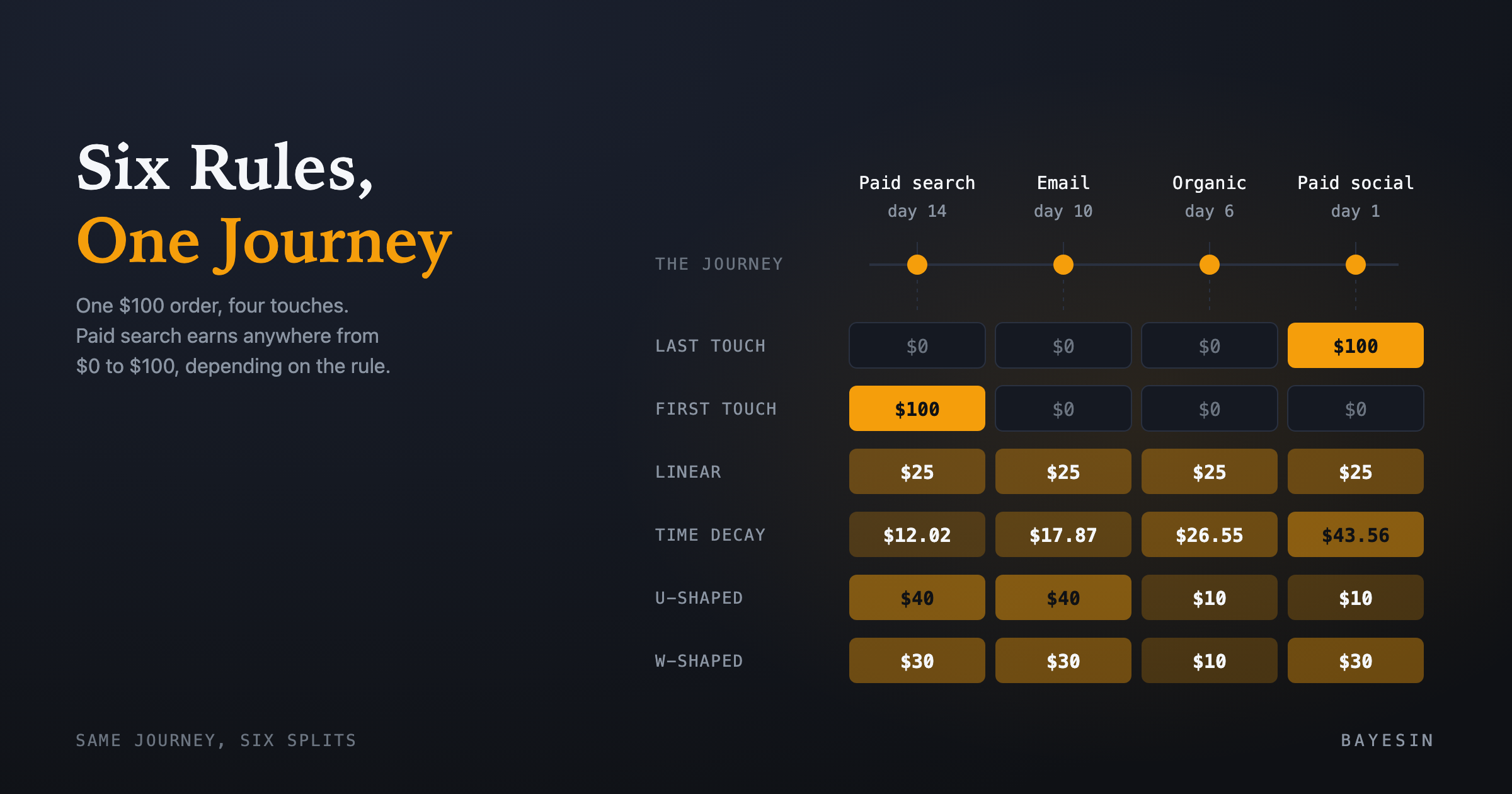
Attribution models compared on one $100 order: paid search earns anywhere from $0 to $100 depending on the rule. See all six credit splits in one table.
Brandon Cade · Sep 21, 2026 · 8 min read
Key Takeaways
- One journey and one order can be divided six ways. The facts stay fixed; only the credit rule changes.
- Last touch and first touch give 100% to one touch. Linear splits evenly. Time decay favors recent touches. U-shaped and W-shaped favor named anchor touches.
- Vendors define the same model name differently, so check the rule before you compare numbers.
- Every model here describes journeys that already happened. None of them shows what would have happened without a channel.
Attribution models compared on a single customer journey show how much the answer depends on the rule you choose. Take a paid search click, then an email, then an organic visit, then a paid social ad, then a purchase. Every model accepts those facts but disagrees about the division of credit, and that disagreement is instructive enough to examine one rule at a time.
Attribution models compared: what does one journey show?
An attribution model is a rule that divides the value of one conversion across the touches that came before it. Run six rules over one synthetic journey and you get six different answers, even though the journey, the order value and the touches never change.
The journey uses illustrative numbers, not real customer data. A customer clicks a paid search advertisement 14 days before buying, subscribes through an email 10 days before and visits organically 6 days before. A paid social advertisement appears 1 day before the customer completes a $100 order.
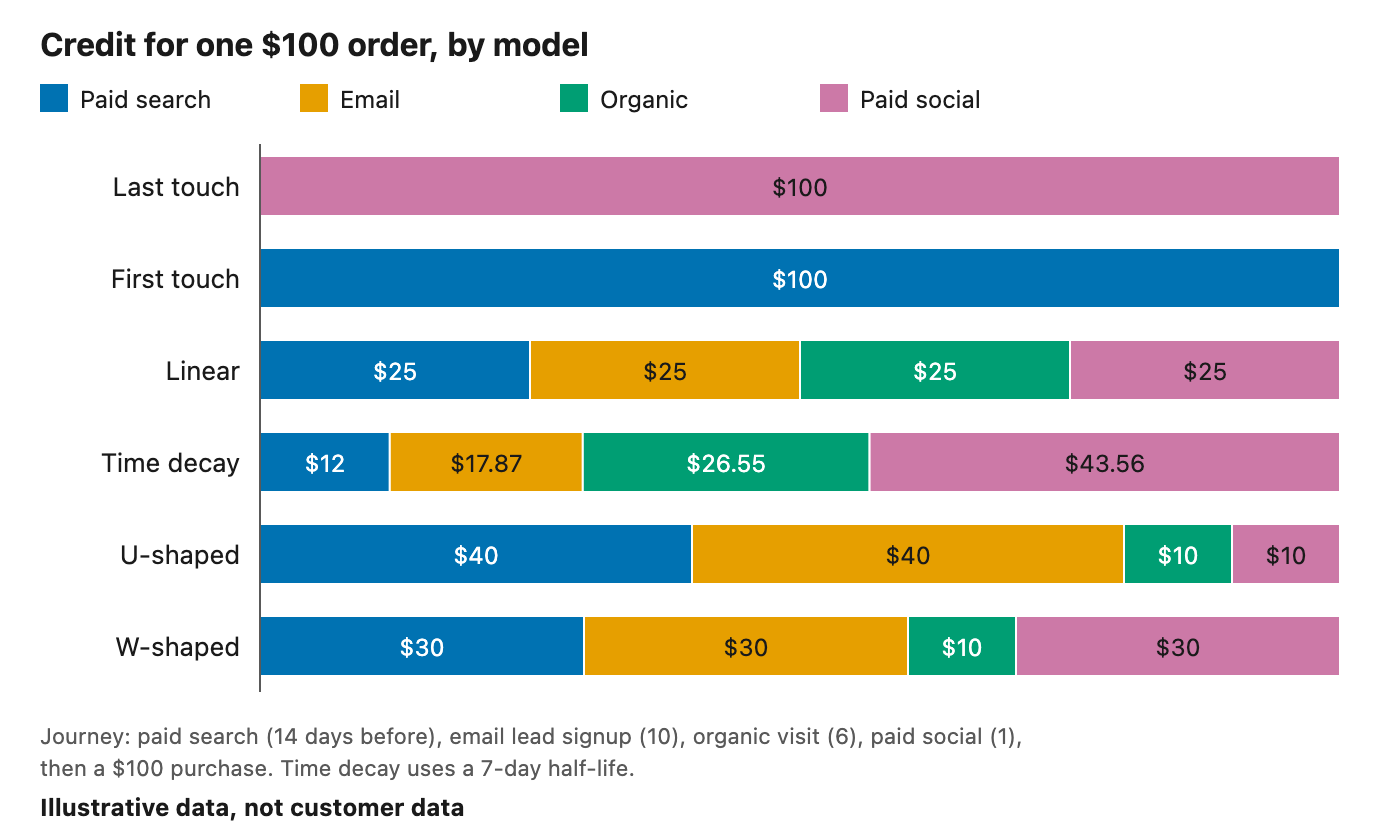
Six models, one synthetic $100 order. Illustrative data, not customer data.
The table gives the same result in numbers, and the sections after it explain each column. If you want the short version first, the plain-English page on what attribution means covers the basics in a few paragraphs.
- Paid search (day 14) — Last touch: $0; First touch: $100; Linear: $25; Time decay: $12.02; U-shaped: $40; W-shaped: $30
- Email (day 10, milestone) — Last touch: $0; First touch: $0; Linear: $25; Time decay: $17.87; U-shaped: $40; W-shaped: $30
- Organic (day 6) — Last touch: $0; First touch: $0; Linear: $25; Time decay: $26.55; U-shaped: $10; W-shaped: $10
- Paid social (day 1) — Last touch: $100; First touch: $0; Linear: $25; Time decay: $43.56; U-shaped: $10; W-shaped: $30
Credit for one synthetic $100 order. Time decay uses a 7-day half-life. Every column sums to $100.
How do last touch and first touch work?
Last touch gives 100% of the credit to the final touch before the conversion. First touch gives 100% to the earliest touch inside the lookback window. Both rules are easy to explain and to audit, so they remain the reference points for judging every other model.
In this journey, last touch credits paid social with $100 and first touch credits paid search with $100. Adobe's Experience League documentation describes the same two rules. It says last touch "gives 100% credit to the touch point occurring most recently before conversion."
The lookback window, meaning how many days back a touch can count, matters more than it first appears. A touch that falls outside the window never enters the calculation. Changing the window from 30 days to 90 days can therefore make first touch point at a different channel, although no customer behaved differently.
Why do teams still use last touch?
Last touch is what many ad platforms report, so it is the easiest model to reconcile against their numbers. Google Ads now offers only last click and data-driven attribution. Its documentation says first click, linear, time decay and position-based "are no longer supported" (Google Ads Help).
The same change reached Google Analytics 4, where those four rule-based models were no longer available as of November 2023 (Google Analytics Help). If you want the other rules, you have to compute them from your own journey data.
How do linear and time decay spread the credit?
Linear splits the order equally across every touch in the lookback and ignores timing entirely. Time decay gives each touch a weight that halves for every half-life before the conversion, then normalizes the weights to sum to 100%.
In this journey, linear gives each of the four touches $25. Time decay with a 7-day half-life weights the touches at 14, 10, 6 and 1 day before purchase by 0.25, 0.37, 0.55 and 0.91. Normalized, those weights give about $12.02, $17.87, $26.55 and $43.56.
A 7-day half-life is a common default: Adobe documents it, and HubSpot describes a 7-day half-life for its time decay model. A shorter half-life pushes time decay toward last touch, while a longer one pushes it toward linear.
How do U-shaped and W-shaped models use anchor touches?
U-shaped and W-shaped models give fixed shares to anchor touches and then divide whatever remains across the middle. HubSpot's U-shaped model gives 40% to the first interaction, 40% to the lead conversion interaction and 20% across the rest. Its W-shaped model adds a third anchor of 30% and shares out the final 10%.
That mid-journey anchor is called a milestone touch, and in this journey the email that captured a lead is the milestone. U-shaped gives paid search $40, email $40, and $10 each to organic and paid social. W-shaped gives paid search $30, email $30, paid social $30 (the last touch) and $10 to organic.
These two models need a defined milestone, so they suit pipelines with a stage worth crediting on its own. The U-shaped and W-shaped tutorial works through the edge cases, such as journeys with no milestone or a milestone that is also the first touch.
Vendors define the same model name differently
Model names are not standards, and two tools can both offer a "U-shaped" model yet divide credit differently. Numbers carrying the same name are not comparable until you have read each rule, so record the rule and window beside every figure.
Adobe also documents a Participation model, which gives 100% of the credit to every unique touch point, so credits exceed the order. It lists an algorithmic model as well, built on statistical techniques from game theory. That model learns its weights from data instead of applying a fixed rule, which places it in a different family.
The U-shaped tutorial compares Adobe's and HubSpot's U-shaped definitions in detail. Whichever family you use, the discipline is the same: write the rule down, pin the lookback window, and keep both fixed when you compare periods.
Reading the spread across models
Comparing one channel across all six models shows how much its credit depends on the counting rule. If the credit barely moves, the channel's contribution does not depend much on how you count. If it swings widely, the argument you are about to have is really an argument about the model.
In this journey, paid search ranges from $0 to $100 depending on the model. Organic ranges from $0 to $26.55, and email gets nothing under first touch and last touch yet $40 under U-shaped. One order is a tiny sample, so the next post in this cluster measures the same spread across 730 synthetic journeys.
Read the spread as a range of plausible credit under different counting rules. It is not an interval around a true value, because it reflects rule choice and not sampling uncertainty.
What no credit model can tell you
Credit models describe journeys that happened, and they do not show what would have happened without a channel. That question is about lift, and answering it takes an experiment or a media mix model, not a different way of dividing credit.
The research on this point is summarized in the pillar page, including the Facebook field experiments of Gordon and colleagues. Their result concerns observational approaches in general, not every attribution rule. It remains a fair warning that a tidy credit table is not a causal estimate.
Google frames its Conversion Lift tool as an incrementality tool that compares a treatment group with a control group (Google Ads Help). Attribution and media mix modeling answer different questions, and a sound practice keeps both.
Which model should you start with?
Start with the model that matches a decision you actually make, and keep a second model beside it for comparison. Fix the lookback window and the rule, then report both. Consistency matters more than the choice itself, because a moving rule makes trends unreadable.
Some pairings suit particular questions. Last touch beside first touch brackets the range for any channel, and linear serves as a neutral middle. Time decay suits promotions, where recency drives the decision, while U-shaped and W-shaped suit lead generation or pipelines with a defined stage. Each answers a slightly different question about the same journey.
Frequently asked questions
Which attribution model is the most accurate?
None is accurate in the causal sense. Each is a rule for dividing observed credit, so each is internally consistent but describes journeys, not effects. The more useful question is which rule matches your decision, and how far your conclusion moves when you swap it for another.
What is the difference between first touch and last touch attribution?
First touch gives all credit to the earliest touch inside the lookback window, and last touch gives it to the final touch before conversion. They usually disagree most about channels that open journeys, so comparing the two brackets a channel's range across the funnel.
Does multi-touch attribution prove which channel caused a sale?
No. Multi-touch attribution divides credit across observed touches and never compares against people who did not see the channel. Proving cause takes a randomized holdout or a media mix model, which is the subject of the incrementality post. Until you have that comparison, treat any credit table as a description of journeys.
Why do my platform's numbers differ from my analytics tool?
Tools often use different models, lookback windows and conversion dates. Google, for example, no longer offers first click, linear, time decay or position-based models in either Google Ads or Google Analytics 4. Compare the rules and windows first, and only then compare totals.
Sources
- Adobe, "Attribution Components," Adobe Analytics documentation
- HubSpot Knowledge Base, "How to understand attribution report definitions in HubSpot's report builder"
- Google Ads Help, "About attribution models"
- Google Analytics Help, "Get started with attribution"
- Google Ads Help, "About Conversion Lift"
- Gordon, Zettelmeyer, Bhargava and Chapsky, "A Comparison of Approaches to Advertising Measurement: Evidence from Big Field Experiments at Facebook," Marketing Science 38(2)
See it on your own rows.
Bayesin is pre-launch. Join the waitlist and we will reach out as access opens.
Get new posts by email.
New posts only. See privacy for what we keep.